
WhatsApp Us -- Email Us

One Panel, Three Rooms: Fixing the Blind Spot Between Monitors

What is a Multi-Room Pressure Monitor?

A multi-room pressure monitor is a centralized wall-mounted environmental monitoring panel (such as the Setra FLEX) that monitors and logs differential pressure, air changes per hour (ACH), relative humidity, and temperature for up to three adjacent rooms or spaces simultaneously. By aggregating multi-room data into one touchscreen interface and a single BACnet BMS connection, it eliminates the compliance blind spots, unsynchronized event logs, and maintenance overhead of using separate single-room monitors.

We recently received an inquiry from a hospital facilities team managing a small airborne infection isolation ward: three adjoining rooms (Anteroom, Airborne Infection Isolation Room, and Protective Environment Room), three separate standalone pressure monitors, and zero unified visibility across the suite.When an accreditation auditor asked to inspect the room pressure relationship history across the entire suite during a specific shift, the engineering team had to pull CSV logs from three distinct devices and manually cross-reference timestamps to verify whether positive and negative pressure cascades had held. Nobody had done anything wrong, but the architecture itself was an operational bottleneck.
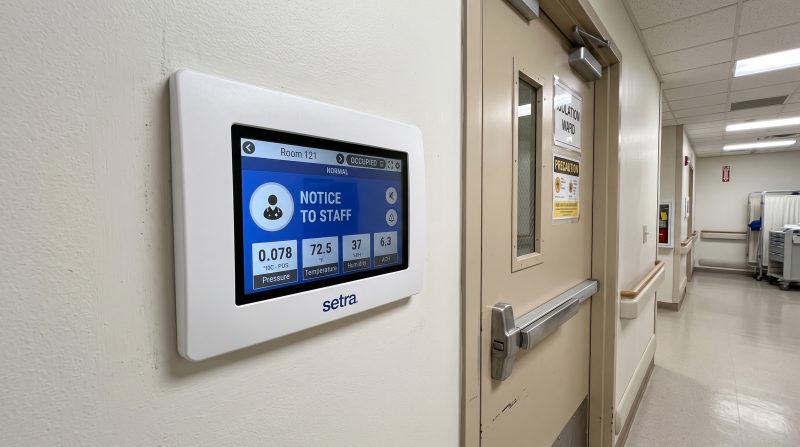
Figure 1. Site documentation: A multi-room pressure monitor mounted in a hospital isolation corridor displaying three room pressure differentials on a single touchscreen interface.

The Root Cause: Single-Room Monitors Create Pressure Blind Spots

A standalone single-room pressure monitor performs its individual task reliably, but it has no contextual awareness of the room adjacent to it.

In healthcare isolation suites, compounding pharmacies (USP <797> / USP <800>), and semiconductor cleanrooms (ISO 14644), absolute room pressure matters far less than the pressure differential between adjacent spaces:

  1. Undetected Cascade Inversions: When a door swings open between an anteroom and a negative isolation room, air volumes momentarily shift. Single-room monitors often log this as a localized excursion without indicating whether air leaked inward or escaped into the clean corridor.

  2. Decontamination Chemical Degradation: Isolation and cleanroom suites undergo repeated decontamination cycles using Vaporized Hydrogen Peroxide (VHP) or Chlorine Dioxide ($ClO_2$). Standard commercial-grade plastic monitor faces corrode, craze, and suffer premature touchscreen failure under aggressive fumigation.

  3. Redundant Field Bus Gateways: Installing three separate monitors means paying for three distinct line-voltage drops, three sets of pneumatic impulse lines, and three individual BMS gateway drops or network ports.

Consolidated Multi-Room Architecture: How Setra FLEX Fixes the Gap
Consolidating multi-room monitoring onto a single hub—like the Setra FLEX—eliminates cross-referencing headaches:

  • Simultaneous 3-Room Differential Display: View pressure cascades, room status indicators (Normal, Warning, Alarm), and door switch states for up to three rooms on one high-resolution touchscreen.

  • Unified Audit Log: One timestamped internal audit trail stores historical pressure trends, door open events, and operator acknowledgments across all three spaces for regulatory review.

  • VHP and Chemical Resistant Enclosure: Built with an anti-microbial, flush-mount faceplate rated to withstand aggressive wipe-downs and gaseous sterilization agents without clouding or optical degradation.

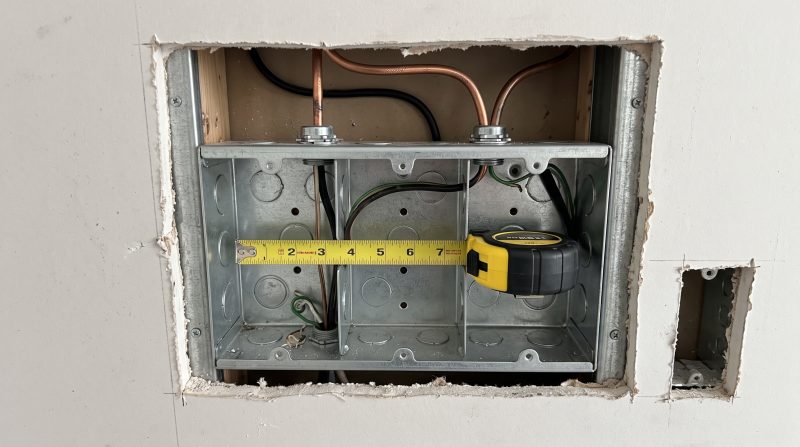
Figure 2. Rough-in verification: Measuring wall cavity clearance inside a triple-gang, double-deep backbox prior to pulling low-voltage and BACnet field wiring.

Practical Specification & Installation Considerations

Before specifying or ordering a multi-room monitor for your facility, verify these four core mechanical and electrical requirements:

1. Confirm Wall Depth and Backbox Standards

The Setra FLEX unit requires a triple-gang, double-deep electrical rough-in box (such as the RACO 697, Appleton M3-350, or equivalent) to accommodate internal electronics, wiring harnesses, and pneumatic ports.

  • Drywall Check: If your wall cavity is shallower than 50 mm (2 inches)—common in modular cleanroom partition walls—you cannot use on-board internal pressure sensors.

  • Solution: Specify the external/remote pressure transducer option (e.g., Setra Model 264 or Model SRCM remote sensors mounted in the ceiling void) and pull low-voltage signal wiring down to the flush panel.

2. Decide FLEX-RM vs. FLEX-RC at the Spec Stage

The Setra FLEX platform comes in two distinct hardware builds that must be chosen before procurement:

  • FLEX-RM (Room Monitor): Designed strictly for monitoring, local visual/audible alarms, and data logging.

  • FLEX-RC (Room Controller): Features an onboard proportional-integral (PI) control loop to modulate variable air volume (VAV) dampers, venturi valves, or fan speed drives via analog 0–10 V / 4–20 mA outputs or BACnet setpoints.

Note: The controller variant requires a distinct mainboard; it cannot be field-upgraded via software firmware if you choose to add active air volume control later.

3. Review Chemical Compatibility Protocols

Cleanroom and isolation room cleaning protocols differ widely between facilities. Ensure your cleaning chemistry is compatible with the faceplate materials:

  • The front bezel and touch surface are engineered to resist Vaporized Hydrogen Peroxide (VHP), formaldehyde, chlorine dioxide, and quaternary ammonium compounds.

  • Compare your facility’s Standard Operating Procedure (SOP) chemical roster against the manufacturer’s chemical resistance table prior to sign-off.

4. Coordinate BACnet MSTP / IP Integration Early

The unit includes native BACnet/IP and BACnet MS/TP communications on-board, eliminating the need for expensive third-party translation gateways. Provide the BMS controls contractor with the standard BACnet point list during the submittal phase to ensure smooth point discovery and prevent commissioning change orders.

Comparison Matrix: Standalone vs. Multi-Room Panels

Specification Parameter3 x Standalone Single-Room Monitors1 x Multi-Room Panel (Setra FLEX)
Operator VisibilityIsolated readings; manual cross-comparisonInstant visual status of all 3 rooms on 1 screen
Audit Compliance Trail3 unsynchronized data logsSingle, unified time-stamped CSV export
Backbox Rough-In3 separate single/double-gang cutouts1 triple-gang, double-deep enclosure
BMS Integration Costs3 field-bus drops / network switch ports1 single BACnet/IP or MS/TP connection
Decontamination ResilienceVariable; commercial finishes degrade quicklyChemical-resistant flush surface rated for VHP/$ClO_2$

Multi-Room Pressure Monitoring FAQs

Can one Setra FLEX panel monitor rooms with opposite pressure regimes (positive and negative)?

Yes. Each channel can be configured independently for bidirectional or unidirectional pressure ranges (e.g., Channel 1 monitoring a -30 Pa isolation room, Channel 2 monitoring a +15 Pa anteroom, and Channel 3 monitoring a corridor reference).

What happens if a door stays open during patient transfer?

The monitor includes programmable alarm time delays (e.g., 30 to 60 seconds) linked to door status switches. This prevents nuisance audible alarms during normal staff ingress/egress while flagging genuine pressure loss if a door is propped open.

How does multi-room monitoring simplify hospital accreditation audits?

Rather than inspecting separate logs from individual wall panels, facility engineers can present an auditor with synchronized trend graphs demonstrating that the differential pressure gradient held across all rooms throughout the operational shift.

Planning Your Cleanroom or Isolation Suite Layout?

Whether consolidating an older multi-gauge installation or designing a new surgical/isolation ward, getting your monitoring architecture right saves significant maintenance effort.

Send our instrumentation team a simple room layout sketch indicating your room count, whether walls are adjacent, and whether you require passive monitoring or active VAV control. We will review your drawing and confirm the ideal backbox, transducer, and network configuration for your facility.

Shopping Cart

Search 3,000+ products

Type a model number, brand or product type.

Popular categories
Can't find it? Tell us what you need. Request a Quote →